

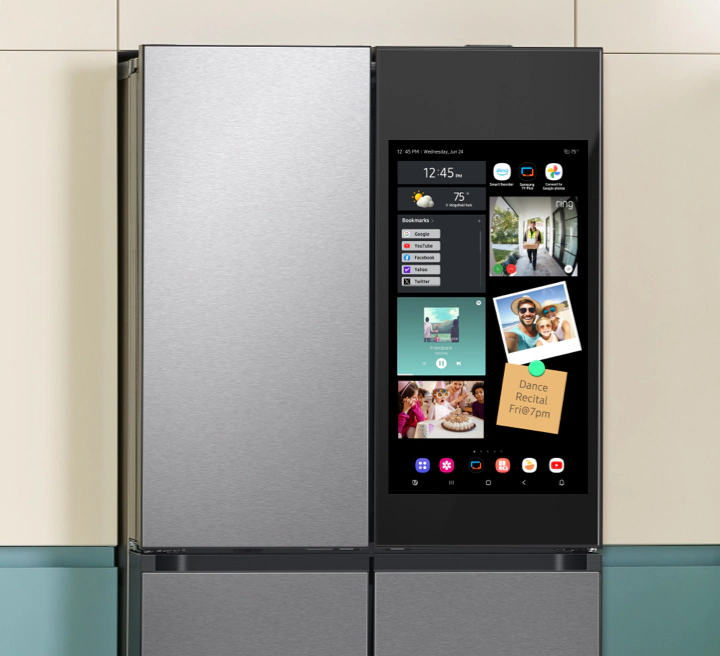
Samsung has quietly begun rolling out advertising on its Family Hub smart refrigerators via a software update. The ads appear on the fridge’s “cover screen,” where widgets, photos, and shortcuts normally live. Users say there’s currently no way to disable them.
This move is part of a pilot program with select advertising partners, presumably to test how consumers react before expanding.
What’s Changing for Fridge Owners
Owners of updated Family Hub units report seeing ad tiles or panels integrated into the default interface. These aren’t full-screen interstitials, the advertisements show up alongside calendar widgets, apps, and photo carousels.
One key concern is that users don’t have control over whether the ads display. There’s no toggle or setting to disable them, according to reports.
Samsung seems to be following a broader industry trend: monetizing smart device interfaces after the initial hardware sale. TVs, thermostats, and other connected appliances have already tested ad placements.
By placing ads on a screen many households see daily, Samsung potentially opens a recurring revenue stream. But that comes with risks, especially backlash over privacy and consumer trust.
Backlash & Consumer Reactions
Many users are upset by what they see as an intrusion: “I paid thousands for this fridge, and now it pushes ads,” one user commented online. Some posts suggest affected models range in price from USD $1,800 to $3,500, implying Samsung may be targeting higher-end units for this test.
There’s also concern about how ads might be personalized. Samsung previously referred to them as “personal ads,” hinting at possible data-driven targeting, though the company has not publicly detailed what data it uses.
What You Can Do Right Now
Monitor privacy settings: if Samsung starts using data like usage patterns or food inventory, you’ll want to know what’s collected and how.
Watch your firmware updates: If your fridge gets an update with ad support, check release notes and settings immediately.
Check whether Samsung adds a setting to disable ads in future updates (some consumer pressure might force that option).
If you haven’t purchased yet, consider delaying or choosing models without “cover screens” or ad interfaces.


